Your cleaning business. One app that fits it.
Tell us how you run things, and we build the rest: $9 a month, you and up to four helpers included, unlimited clients and visits.
1 month free. No card.
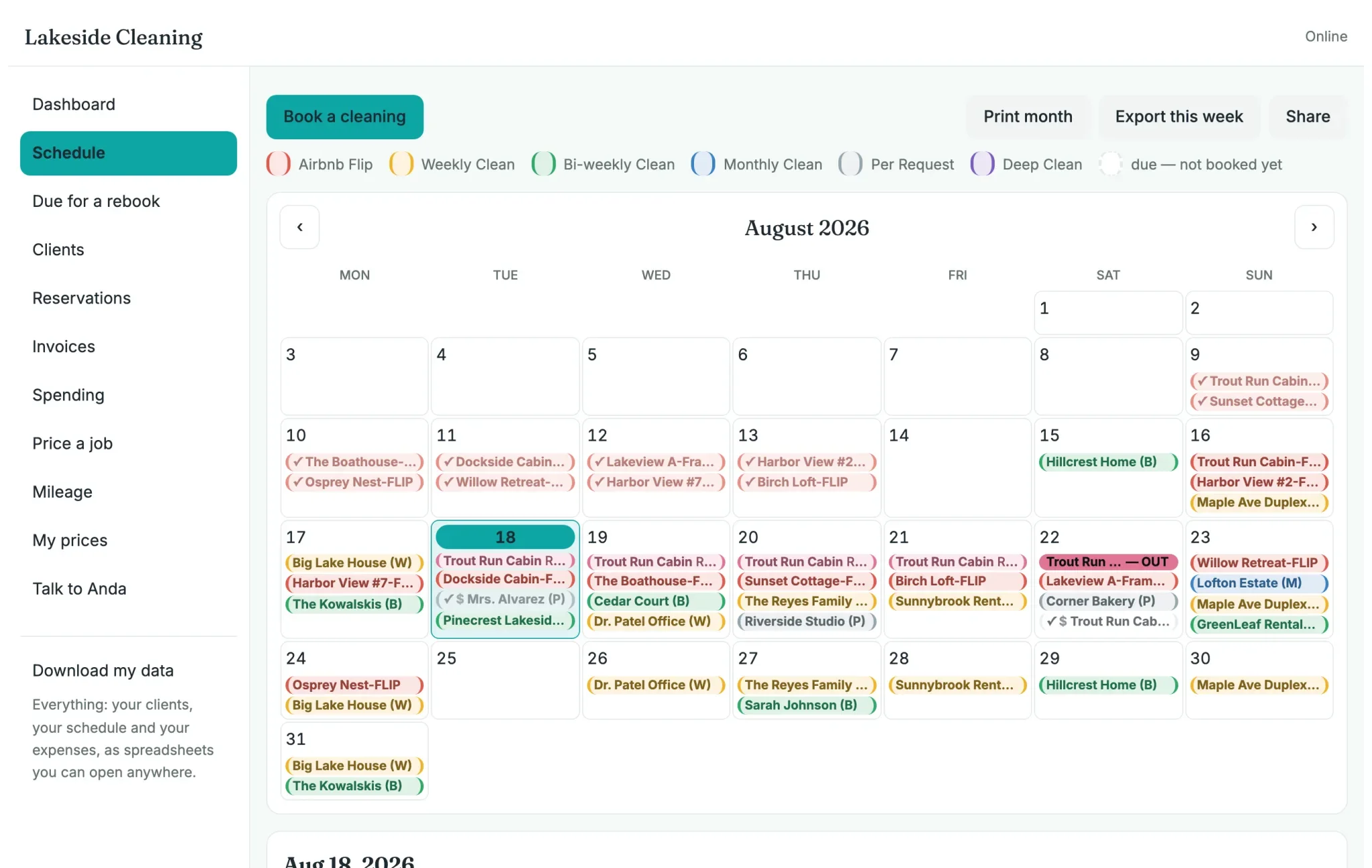
Your month, filled in for you.
From the last visit and how often you go. Flips in red, weekly in yellow, biweekly or fortnightly in green, monthly in blue.
Invoices, integrations, and unlimited support from a real person. We got you covered.
In their words
Written in public by people who run a cleaning business like yours.

Your free month
It fits, because somebody makes it fit.
Tell us how you run things. We build the rest.
First
Start the free month
Your email and your business name. That is the whole signup. 1 month free. No card.
Then
Write to us in the app
Talk to Anda is a screen in the app, and a real person reads it. Say what is missing, how you colour your calendar, which screens you never use. Several of the screens on this page began as one customer writing to say what she was missing.
Rather not start with an empty calendar? Send your client list, a spreadsheet, or a photo of your paper diary to contact@tendmatehq.com, and we set it up for you before you log in. Included in the price.
By the end
An app that fits your business
What you ask for gets built, free, and it arrives for everyone. Your job types, your colours, only the screens you use. $9 a month after, you and up to four helpers included.

One price. That is the whole pricing page.
$9per month, flat
1 month free. No card.
- You and up to four helpers. More are $1 a month each.
- Unlimited clients, unlimited visits. No appointment caps.
- Phone and laptop, always in sync — and it works with no signal.
- Your schedule fills itself in from how often each client is due.
- Setup done for you, free — send your client list or a photo of your spreadsheet.
- One-click export, no contract, cancel any time.
Already in another app, or in a spreadsheet?
Send it to us as it is: an export, the sheet, or a photo of your diary. We bring your clients, how often each one is due, your prices and your history across before you log in. It is free, and your old app keeps working while you decide.
If you pay for one of these today, its page has their prices beside ours and where your export button is:
Moving from ZenMaidMoving from JobberMoving from Housecall Pro
Founding members keep $9/month for good. We expect to settle at $12.
Before you start
Questions people ask
Does it text or email my clients?
Not yet, and if you want it, ask: a feature a customer asks for gets built, and it is free. Emails to your clients would cost you nothing. Text messages would be a small package, because the SMS providers charge for every message sent, not us. Today TendMate keeps the schedule and the records, and you message your clients the way you already do. For somebody who rang for a price it keeps the message you sent and what they replied.
Can my clients book online?
Not yet. Your work is the same clients coming round on a rhythm, so the calendar fills itself in from how often each one is due, and a new enquiry is written down as a lead with the day to come back to them. If your clients want to book themselves, say so: a calendar you share with your free days, where a client picks one, is the kind of thing we build for the person who asks, at no extra cost. We will work out together what suits your business best.
What does a helper see?
The schedule, the addresses and the notes for the houses she is sent to, on her own phone. Not your prices, your expenses or your totals. You choose, screen by screen, what each helper can open.
What if I have more than four helpers?
Contact us. Extra seats are $1 a month each, and we add them for you. Tell us how you run them too: if you want them in teams, or there is something that would make managing them easier, that is exactly the kind of thing we build for you, free.
Does it work without signal?
Yes. Everything you need is on the phone already, so a basement or a stairwell with no signal is not a problem, and it catches up when you are back in range.
I already have a spreadsheet, or another app. What happens to it?
Send it to us: a spreadsheet, a CSV, an export from another app, or a photo of your paper diary. We bring your clients, your schedule and your history across before you log in, and that is included in the price. If you pay for ZenMaid, Jobber or Housecall Pro today, their prices beside ours, dated, and the steps to export your clients:
TendMate or ZenMaidTendMate or JobberTendMate or Housecall Pro
What happens after the free month?
$9 a month, flat, for you and up to four helpers. No card is taken during the month, so nothing is charged unless you choose to carry on. Cancel any time and export everything, clients, visits and history, in one click.
You are running a cleaning business on a spreadsheet.
Not because you like it. Because the software built for your trade costs $39 to $239 a month, charges extra for every helper, and takes a weekend to set up.
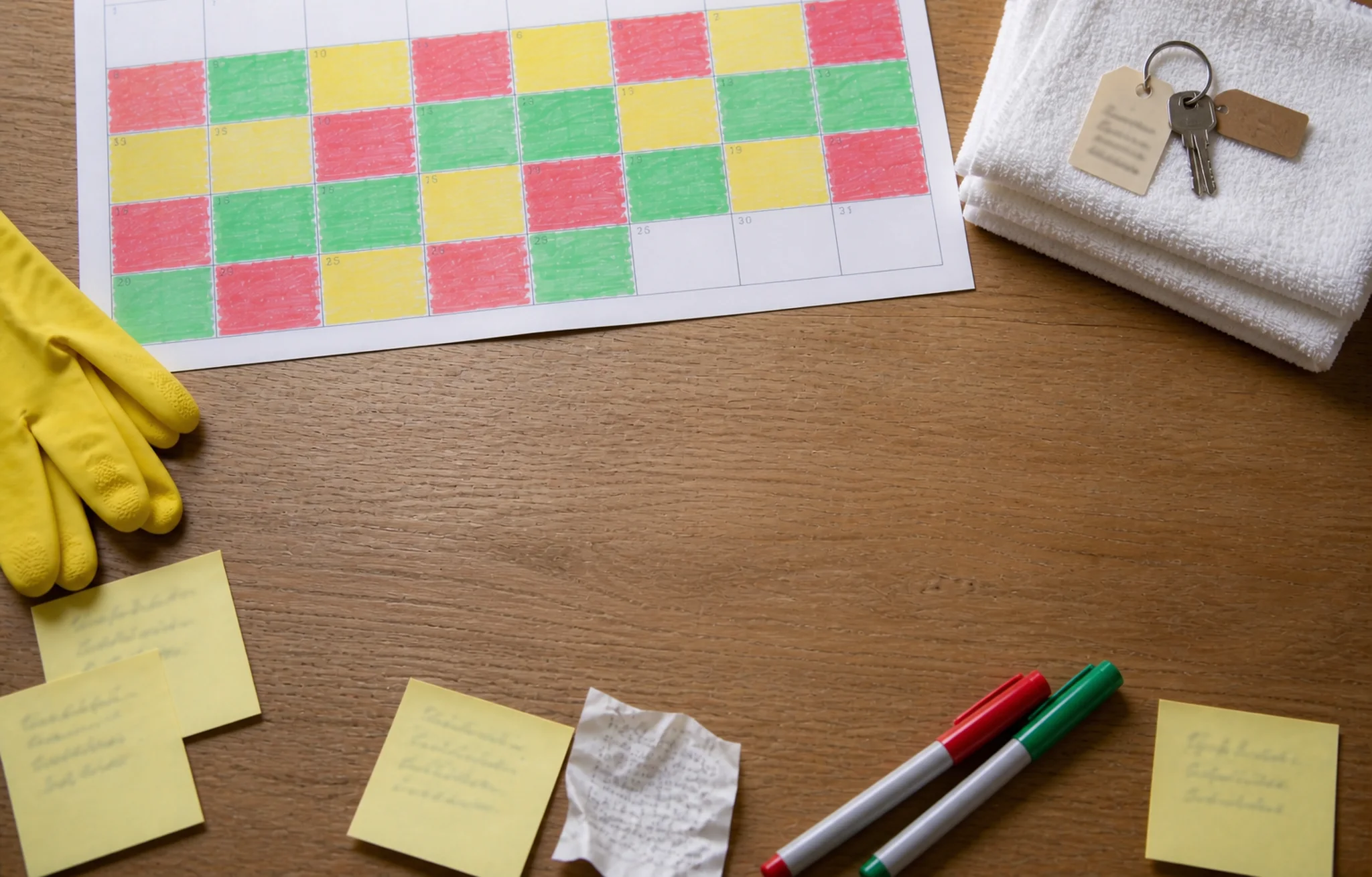
So you colour-code an Excel calendar by hand — flips in red, weekly in yellow, biweekly or fortnightly in green, monthly in blue — and hope you have not missed anyone. That is the whole problem we are solving.
Today, and after
Why most cleaning schedules fall apart
The next date
On the spreadsheet
Nearly every spreadsheet we have seen has the same flaw: it lists the next appointment. That works until one client moves a Tuesday, one gets skipped for a holiday, and one goes monthly for the winter. Now every date after that is wrong, and the only way to fix it is to re-type the whole column.
In TendMate
The fix is small and it changes everything: record the last clean, not the next one. The last clean is a fact — it either happened or it did not. The next one is arithmetic:
Next due = Last cleaned + Frequency (in days)
Weekly = 7 · Bi-weekly = 14 · Monthly = 28 · Per request = no interval
Move a job, skip a week, take a holiday — you only ever update one cell, and every due date downstream corrects itself. That is the whole trick, and it is what TendMate is built around.
Who is due
On the spreadsheet
On Sunday night you scroll the whole sheet, checking every row against the calendar, and hope you have not missed anyone.
In TendMate
Due for a rebook lists the clients whose turn has come and gone, soonest first, and the window is tuned to how often each one comes round. Tap the row and the cleaning is booked on the day their rhythm expects.
The check-out
On the spreadsheet
A check-out is written on the paper calendar, and the next guest arrives whether you made it or not.
In TendMate
Flips show red, because those have a deadline. Enter the stays, or import the booking calendar from Airbnb, and every check-out that still has no cleaning booked after it is flagged.
Your first helper
On the spreadsheet
Sharing the schedule means sharing the spreadsheet, prices and all, or texting a photo of it every evening.
In TendMate
A helper gets her own login, included in the price. Her phone holds the schedule, the addresses and the notes for the houses she goes to, and not your prices, your expenses or your totals.
Getting paid
On the spreadsheet
Who has paid is a column you fill in from memory, and who has not is a question you answer by scrolling.
In TendMate
Every finished cleaning waits to be paid until you mark it, and the dashboard shows what you are owed, oldest first. An invoice is made from the work you did and opens as a PDF, which you send the way you already do.
What you get
The whole app,one feature at a time.
Here is each part of the app, with the real screen beside it. Anything you do not use can be switched off.
The calendar
Your month fills itself in, and the week shows the hours.
Schedule
Your month fills itself in
Tell it how often each client wants you, and every cleaning after the last one is already on the calendar.
Weekly, biweekly or fortnightly, monthly, or only when they ask: set it once per client. When a cleaning is done, the next one is placed from that day, not from a date somebody guessed in January.
Move one cleaning and choose whether the rest move with it.
Schedule · Week
The week, against the clock
Timed cleanings sit in their hours, and the ones with no fixed time wait in a band at the top.
Drag a cleaning to another hour, or pull its edge to make it longer. The people on it are marked on the block, so a full day reads at a glance.
Print the week, or export it to the calendar on your phone.
Due for a rebook
Nobody gets missed
The clients whose turn has come and gone with nothing booked, soonest first.
A client on every three weeks who was last seen four weeks ago is on this list, marked overdue. Tap the row and book them on the day their rhythm expected.
When the list is empty, it says so. That is the whole point of it.
Reservations
Every check-out gets its cleaning
For holiday lets: the stays at each property, and what each check-out needs after it.
Enter the stays, or import the booking calendar from Airbnb, and the app shows every check-out that still has no cleaning booked after it.
Your clients
Everything about each one, kept where you need it.
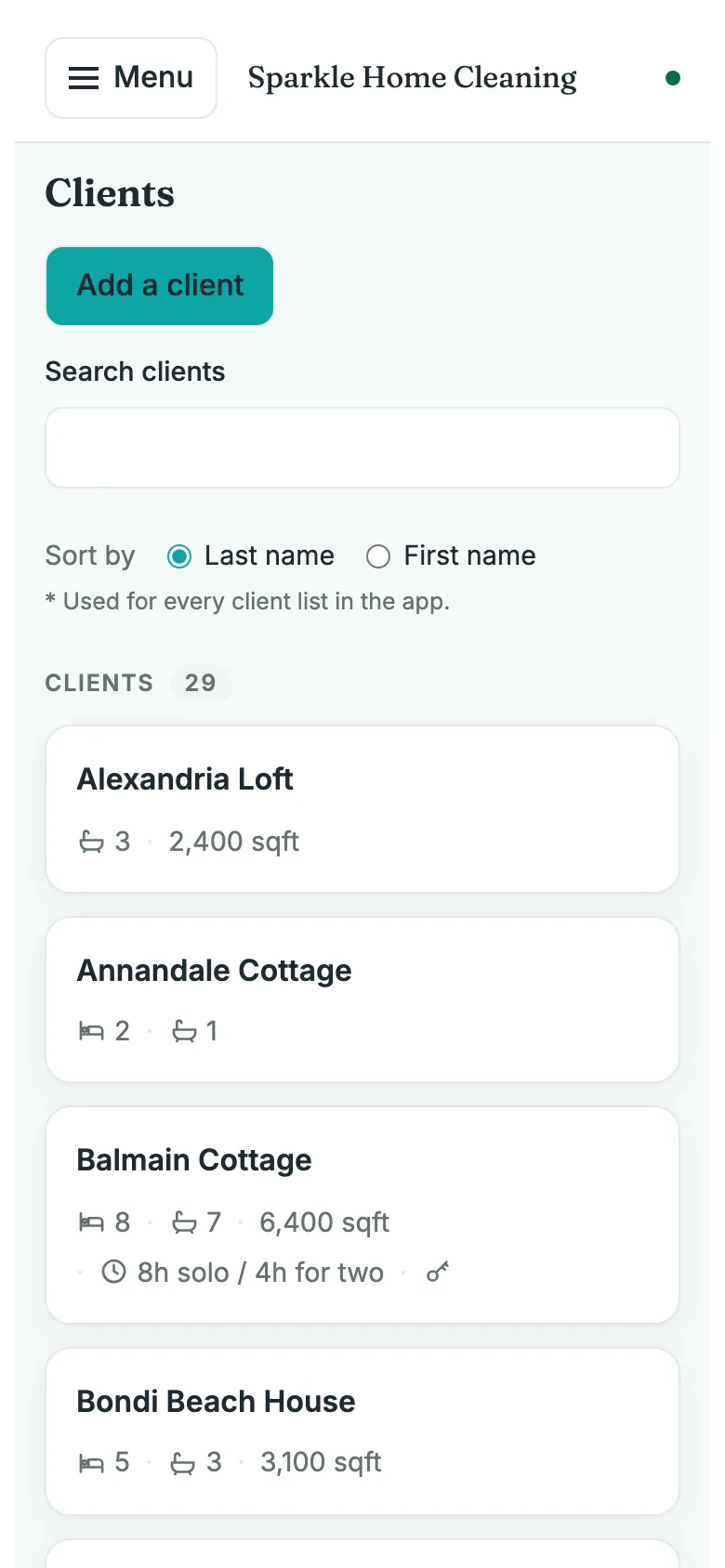
Clients
Every client, filed the way you find them
Name, address, phone, how often, the rate, and the door code: one record per client, A to Z by last name.
Each client card shows what you glance at before you leave: beds, baths, hours, and whether you have the key.
A client with more than one place keeps each one on its own page, with its own rhythm and its own notes.
Checklists
A checklist for every kind of cleaning
The list you already keep in your head, written down once and attached to each cleaning.
Make a standard list for each kind of cleaning, and add the lines that only one client needs.
Whoever does the work ticks it off on the day, on their phone.

Leads
Everyone who asked for a price, and the day to come back to them.
Leads
Nobody who asked is forgotten
Somebody rings for a price: write down who, what for and what you quoted, and the app keeps the queue.
Who to follow up with today, this week and later, in bands, so the one from three weeks ago is not lost under the new ones.
A lead that says yes becomes a client; one that says no is filed, with why.
Leads
Your own words, saved once
Write a follow-up message once, and use it on every lead with one tap.
Anything in braces fills itself in: their first name, the service they asked for, the price you quoted.
Three messages come with the app; yours sit beside them.
Leads
Follow up, and write down what they said
One tap opens a text, WhatsApp or email; you send it from your own phone and mark it sent.
Write down the reply when it comes. When they say yes, one tap makes them a client, with everything already filled in, and the lead keeps its history: what was sent, when, and what they said.
The money
What you earned, what you are owed, and what to charge.
Dashboard
Who is due, and what you are owed
The two questions you open the app to ask, answered on the first screen.
What you earned this month, today's cleanings, the clients who are due for booking, and the money still waiting to be paid.
Tap the amount waiting and you get the list behind it, oldest first, with Mark as Paid on each row.
Price a job
A price in seconds
Answer a few questions and the app works out your price, from your own rates.
The calculator uses the prices you set, so a quote to a new client matches what you charge everyone else.
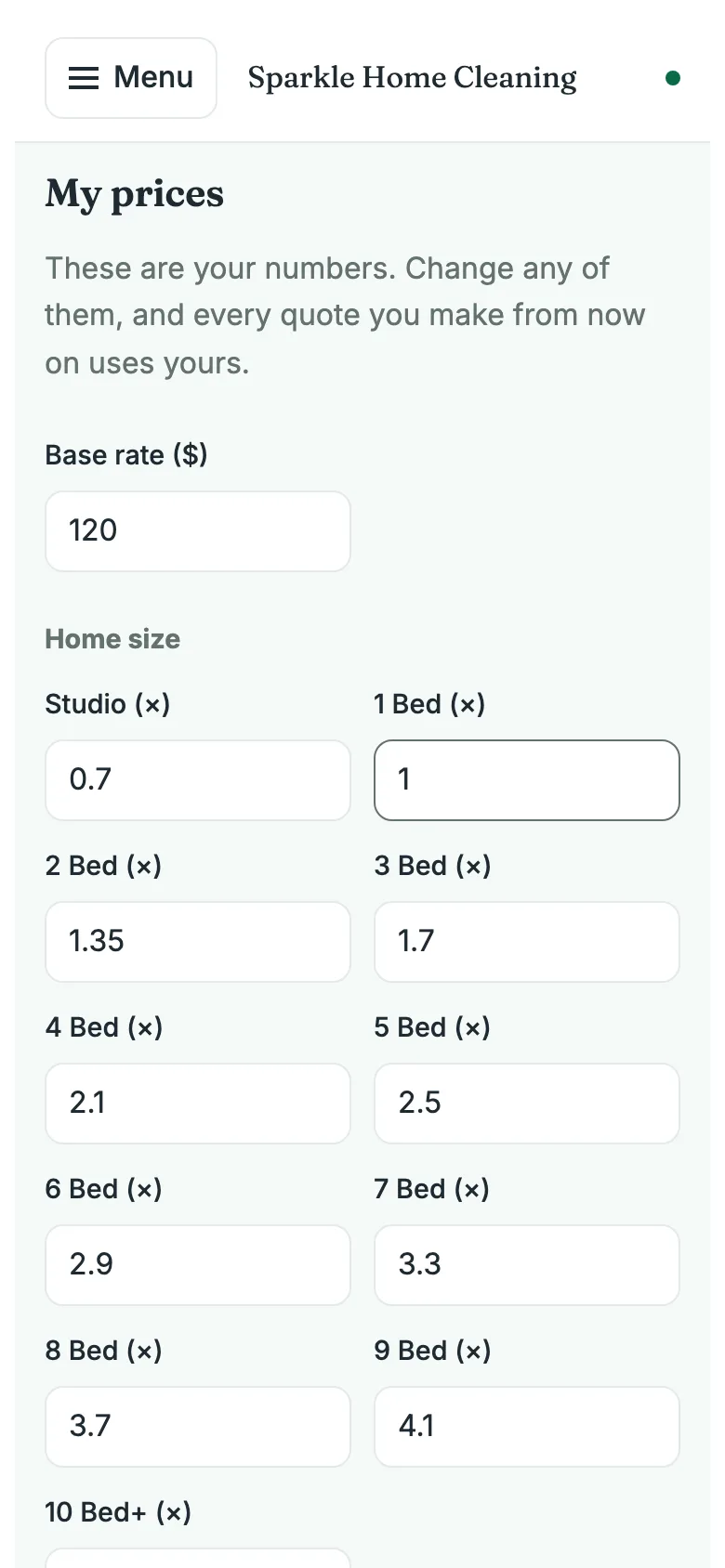
My prices
Your numbers, in one place
Your base rate and every multiplier, changed once and used everywhere.
Raise your rate in January and every quote from then on uses the new one. Nothing to remember, nothing to copy across.
Invoices
Invoices from the work you did
Pick the cleanings that go on it, change a price if you need to, and open it as a PDF.
Tick what goes on the invoice, edit any line, add one of your own. Download it or open it as a PDF with your name and logo on it, and send it the way you already do.
Every invoice you save is kept as a document you can open and print again.
Expenses
Your spending, ready for tax time
Write down what you spent as you spend it, in the categories set up for your trade.
Supplies, fuel, equipment: each one dated and filed, so the end of the year is a list and not a shoebox.
Bought something for one client? Tick it and it lands on their invoice.
Mileage
Every mile, counted
The drive to each client, added up for you.
Set the round trip once per client. Every cleaning you complete adds its miles, and the total is worked out at your rate.

Your helpers
The work, without the money, on their own phones.
Team
You and up to four helpers
Give each helper their own login, included in the price, and decide screen by screen what each one can see.
Assign one or more people to a cleaning. A helper's phone holds the schedule, and the addresses and door codes only for the clients she is going to.
Prices stay yours unless you choose to share them. That removal happens on our side, not on her screen.
Need more than four? Ask us, and extra seats are $1 a month each. 1 month free to start, no card, helpers included.
Your phone
It works where you work, and shows only what you use.
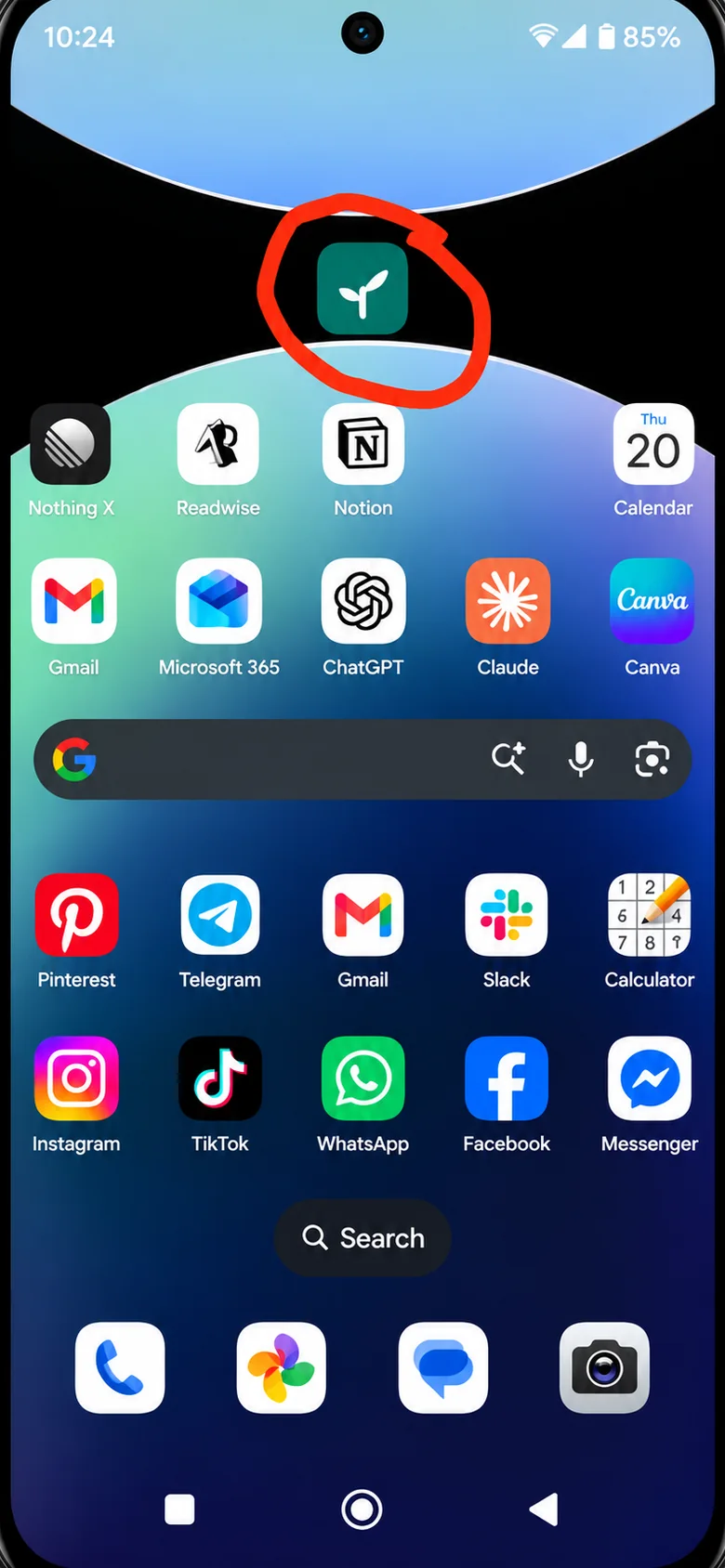
Add to Home Screen
On your home screen, like any other app
On your phone, open cleaning.tendmatehq.com, choose Add to Home Screen, and from then on it opens with one tap.
On an iPhone: open cleaning.tendmatehq.com in Safari, tap the Share button at the bottom (the square with the arrow pointing up), then Add to Home Screen, then Add.
On an Android phone: open cleaning.tendmatehq.com in Chrome, tap the three dots in the top corner, then Install. If it offers Install or Create shortcut, choose Install, so it opens in its own window. Some phones say Add to Home screen instead.
It sits with your other apps and opens straight into your day, with or without signal.
Offline
Works with no signal
In a basement or at the end of a lane, the app still opens and still saves.
Everything you need for the day is kept on your phone. What you change is sent the moment you are back online.
Add it to your home screen and it opens like any other app.
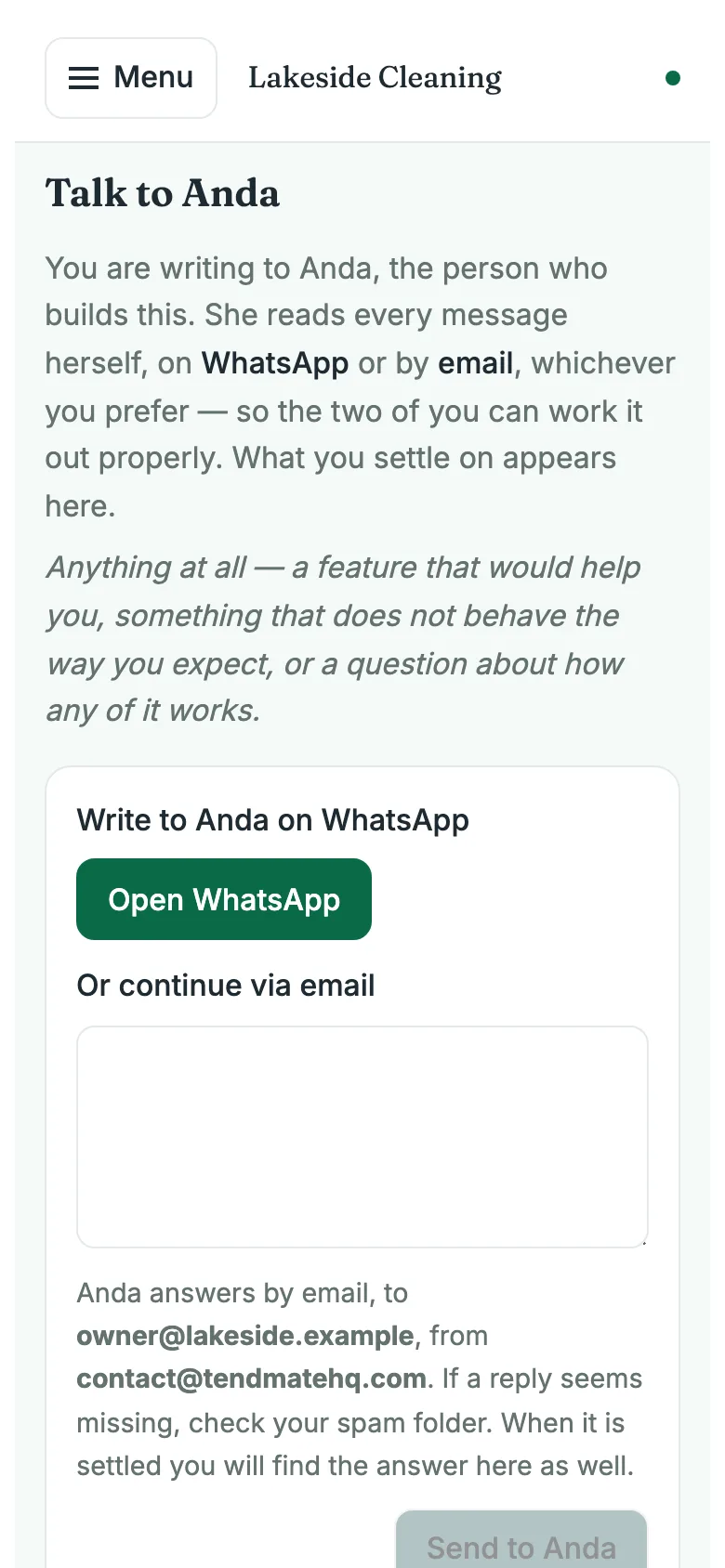
Talk to Anda
Talk to a person
A question goes to Anda, who built this, and the answer comes back to your inbox.
No bot and no ticket number. What you asked and how it ended are kept in the app, so you can look it up later.
Your data
Your data is yours
Download everything, clients and cleanings and spending, as files you can open anywhere, whenever you like.
If you ever leave, the app stays readable for a month so nothing is lost in the move. Door and alarm codes are kept encrypted.
Settings
Only what you use
Every part of the app has a switch. Turn off what you do not need and it leaves your menu.
No setup to do and nothing to configure: your trade arrives already set up in its own words. If you never invoice, switch invoices off; put them back whenever you like.
Built for you if…
- You clean houses on a repeating schedule and you are tired of working out who is due.
- You do Airbnb turnovers, where the next guest arrives whether you made it or not.
- You have just hired your first helper and need to share the schedule without sharing what you charge.
- You run the business from your phone at night and the laptop on Sunday, and both should show the same thing.
- You want something genuinely simple — not “simple” with forty settings.
1 month free. No card. Your email and your business details — that is the whole signup.